Voitta GitHub
Open-source AI tools · Workflow pilots Runs on your own machines

Bring ROI to your AI.

We started by building productivity tools for ourselves. Too much of our time went to copying between systems, digging through documents and explaining the same context to AI again and again. So we built tools to do that work for us. We use them every day, and they're open source.

They run on your own machines, and Voitta never sees, records or stores your data. When you're ready to go further, our team helps you rebuild your workflows around them.

01 · Tools

Open-source tools you run yourself

Each tool installs on your own laptop or server, usually with one Docker command. There is no Voitta account to create and no Voitta service in between. Your files, prompts and conversations stay where you put them, and when a tool needs an AI model, it calls the provider you choose with your own key.

Illustration of the Voitta Bookmarklet: an assistant panel open beside a web page.

Tool 01

Voitta Bookmarklet

An AI assistant on any web page.

Click the bookmarklet on any page and an assistant opens beside it. It reads the page you are on, runs Python for analysis and reports, and keeps your conversations and projects on your machine. Bring your own model: an Anthropic, OpenAI, Gemini or Requesty API key, or a Claude subscription.

Run it with Docker
docker run -d --name voitta-bookmarklet \  --restart unless-stopped \  -p 127.0.0.1:12358:12358 \  -p 127.0.0.1:12359:12359 \  -v voitta-bookmarklet-data:/data \  ghcr.io/voitta-ai/voitta-bookmarklet:latest

Then open http://127.0.0.1:12358/bookmarklets. A macOS menu-bar app and a from-source install are in the README.
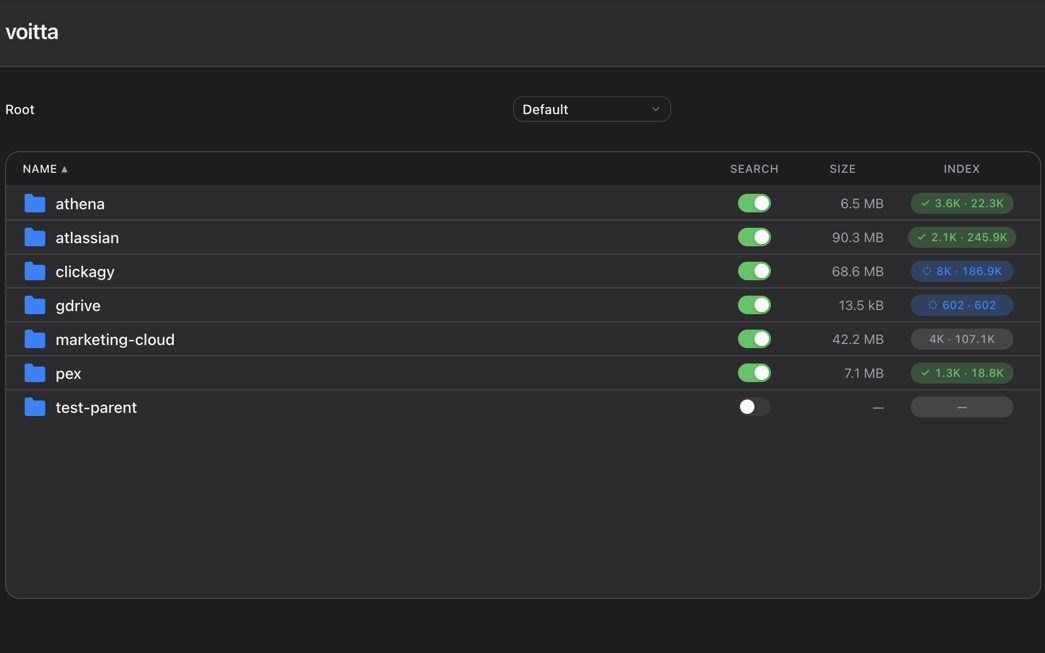

The Voitta RAG web interface: indexed folders with a search toggle, size and index status for each.

Tool 02

Voitta RAG

Search your docs and code from any agent.

A self-hosted knowledge base. It indexes Git repositories, Google Drive folders, Jira boards and office documents, and makes them searchable from Claude Code and other agents over MCP, or from its own web interface. Embeddings are computed locally and stored in a Qdrant database on your machine.

Run it with Docker
git clone https://github.com/voitta-ai/voitta-rag.gitcd voitta-ragcp .env.sample .envsed -i.bak "s|^VOITTA_ROOT_PATH=.*|VOITTA_ROOT_PATH=$HOME/voitta-rag-data|" .envmake docker-build && make docker-up

Then open http://localhost:58000. For teams, Voitta RAG Enterprise adds images, PDFs, CAD drawings and per-folder sharing.

The Voitta Desktop mascot: a terracotta dog, which also appears as the menu-bar icon.

Tool 03

Voitta Desktop

Spend fewer tokens in Claude Code.

A macOS menu-bar app that sits between Claude Code and the model. It optimizes the context of every request to save tokens, and the menu bar shows your running savings. It also lets each Claude Code window use its own model account, and gives Claude one MCP endpoint for your Voitta RAG, Google Workspace and Jira.

Install on a Mac
1. Download the .dmg from the latest GitHub release.2. Drag Voitta Desktop to Applications and open it.3. Click the dog in your menu bar.

Settings → Actions → Configure Claude points Claude Code at the local proxy. Everything runs on 127.0.0.1.

Exhibit 1 Where your data goes when you use each tool.
ToolRuns onYour data is storedAI model calls go to
BookmarkletYour computer, in Docker or as a macOS appA Docker volume on your computerThe provider you pick, with your key or Claude subscription
RAGYour computer or your servers, in DockerYour disk and a local Qdrant databaseNo model calls; embeddings are computed locally
DesktopYour Mac, as a menu-bar appA folder in your home directoryThe account Claude Code already uses, or one you add

Source: each project's README on GitHub. None of the three sends data to Voitta, and none includes analytics or telemetry.

Exhibit 2 RAG Enterprise is in production.
Files indexed on one production instance
93,000
Sources connected to that instance
46
Lines of code shipped in five months
~90,000
Automated tests in the same period
1,193

Source: Voitta, October 2026.

02 · Work with us

Prove the value before you commit the budget.

Every engagement follows the same three steps. You only sign a larger contract after a pilot has shown measured results on your own work.

  1. Book a demo

    Free · 30 minutes

    Tell us about one workflow your team would happily hand off. We show the tools on a case like yours and tell you honestly whether it's a fit.

  2. Run a pilot

    From $10,000 · one 2-week sprint

    We agree on one workflow and one measurable goal, in writing. Once we have access to your systems and data, we build and test a working version in two weeks.

  3. Scale what's proven

    Statement of work

    If the pilot hits its goal, we sign a statement of work to roll it out: fixed scope, fixed price, and milestones you can report on. The pilot fee is credited in full.

After rollout, we keep it running and growing with you: monitoring, model upgrades and a new workflow each quarter.

Book a demo or write to contact@voitta.ai
03 · Applications

What a pilot can produce

These are applications we built on our own tools and tested in companies we made up, so we can show real workflows without showing anyone's data. Each one below says which tools it is built on.

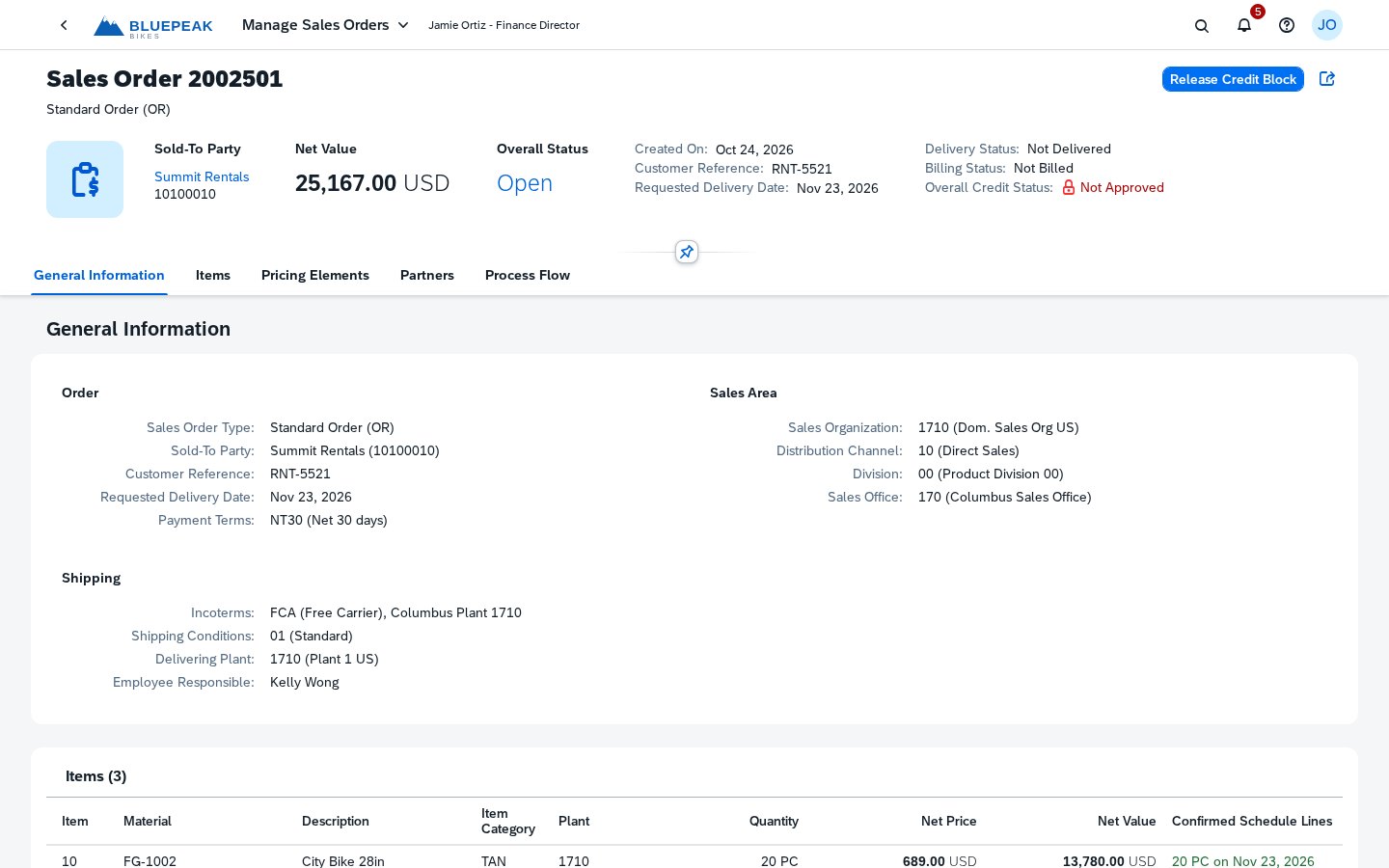
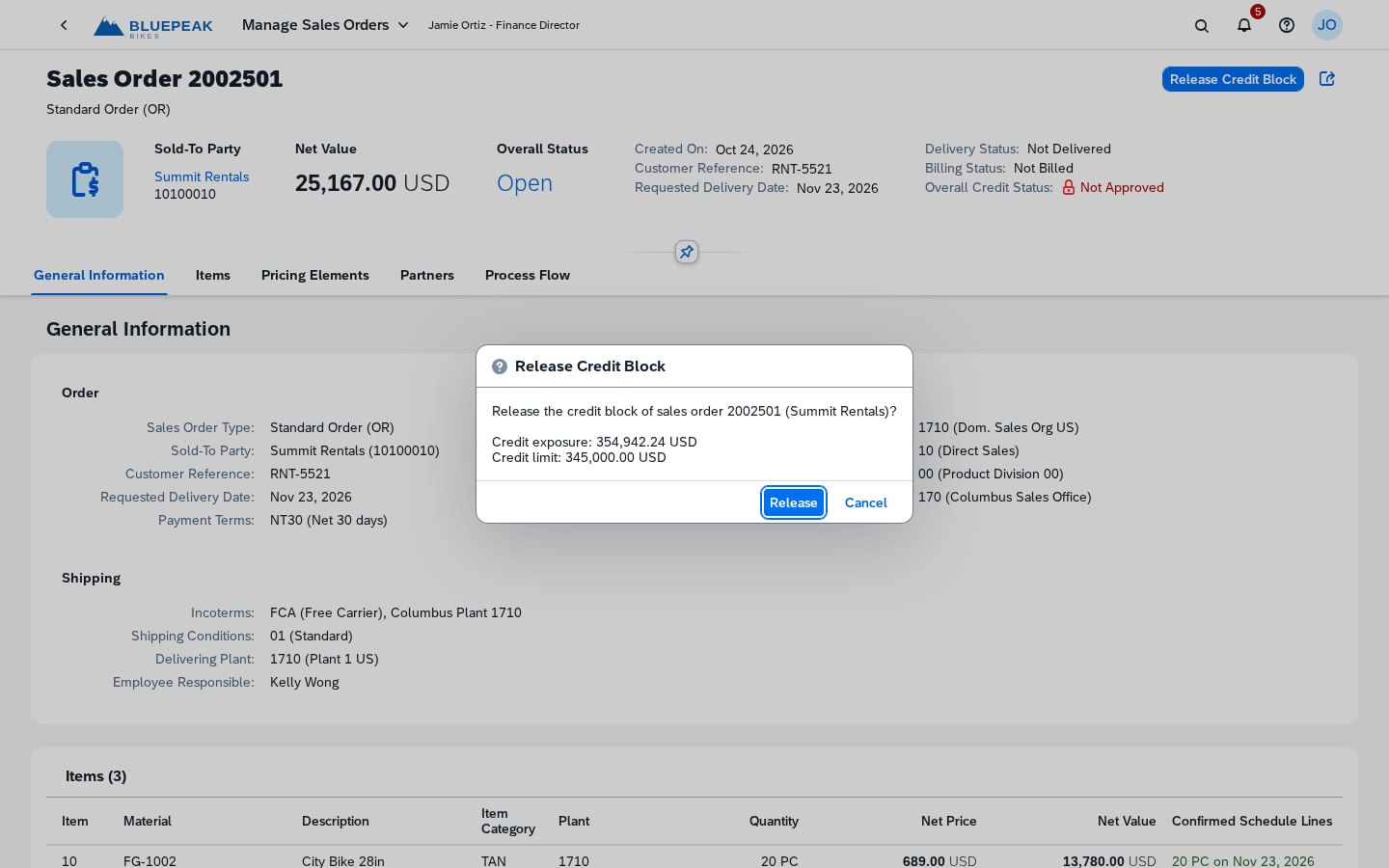
Exhibit 3 An agent that works in the ERP screens people already use.
erp.voitta.ai · demo ERP
Sales order 2002501 for Summit Rentals, with Overall Credit Status: Not Approved and a Release Credit Block button.
  1. 1
    Read the screen. Order 2002501 is saved but blocked: overall credit status is Not Approved.
  2. 2
    Act like the role. Open Release Credit Block, the same button the finance director would press.
  3. 3
    Confirm and check. Release the block, then read the status again.

Built withVoitta RAGBrowser and KVM control in development

Real screens from a demo ERP we built to test agents. It is Fiori-style, built on the open-source OpenUI5 library, and is not SAP software. Bluepeak Bikes and Summit Rentals are fictional. The cursor path is a replay for this page.

Engineering · CAD overlay

From trade study to steering-committee report, inside the engineering app.

An assistant pane opens over a cost flowchart and a CAD render, pulls BOMs, PLM data and fleet statistics, and writes the report in place.

Built withBookmarkletRAG Enterprise

Engineering knowledge · CAD · PDF · BOM

CAD, drawings and bills of materials, previewed where they live.

File shares, Google Drive and PLM exports are indexed side by side. Permissions follow each folder, and any agent can reach the files over MCP.

Built withRAG Enterprise

Wealth management · Context-aware

An assistant that knows which client is on screen.

Over a client book of 5,000 documents, it reads the screen, finds the evidence, does the arithmetic and cites each source.

Built withBookmarkletRAG

05 · Team

The people behind it

RS

Roman Semein

Co-founder and CEO

About 25 years in AI and machine learning. Built GPU analytics at RadiumOne. Architect of the Voitta platform, and runs the lab's model evaluations.

GG

Gregory Golberg

Co-founder and CTO

MIT computer science. Founding CTO through two acquisitions, and a founding engineer at SnapLogic. Writes the Voitta blog.

NM

Nadya Mitchener

Product Adviser

AI product at Simr, in engineering simulation, and at Adobe. MBA from NYU.

SB

Sagiv Ben Yakov

Sales & Business Development Adviser

Technology leader and manager, currently at Agnitio.ai in Palo Alto. Has worked across the Bay Area, Washington, DC and Tel Aviv. Studied at Ben-Gurion University.

Getting started is simple.

Send us a note about one workflow your team would happily hand off. We'll set up a short call, demo the tools on a case like yours, and quote a two-week pilot with a goal you can measure.

contact@voitta.ai